
101 Practical Ways to Ditch That Textbook: Get Matt’s free ebook with lots of great ideas (including two FULL pages of Google stuff!). Sign up for his e-mail updates in the right sidebar of this page.

1. A cultural exchange: My students were fortunate to participate in a cultural exchange created between me and a teacher in Spain. Students met in pairs via Skype to discuss predetermined topics and to just talk about whatever they wanted. They then wrote in their second language (Spanish or English) about the conversation and the other students help correct their mistakes. (I’ve written several posts about this exchange.)
2. Public blogs: Writing has always been at the core of many subjects. This takes writing and gives it a new, exciting potential audience: the world. Students write in publicly accessible blogs and share them via any channels possible (i.e. school website/newsletter, Twitter/Google Plus communities, listservs, etc.). They then have interactions with people about their ideas that they would never have otherwise.
3. Global perspectives: Students connect with a class in another part of the world to discuss a historical event — preferably one that affects both their own countries. Students write — in shared Google Documents, blogs, wikis or any other writing tool — factually about the event and then share opinions about it. They can compare how it’s perceived in different parts of the world. (Inspired by this post.)
4. “Aid the community” competition: Students from various countries engage in a project to tackle an issue in their communities (i.e. reducing the carbon footprint of their communities). Students share ideas on a wiki, discuss ideas together via video chat on Skype/Adobe Connect/Google Hangout, and partner with researchers at local universities or companies. They share the findings of their yearlong endeavor in a documentary on YouTube. (Source: ECISD Technology)
5. eBook authors: Creating an eBook opens students’ work up to a global audience. Students’ hard work to research or create a project can be produced digitally and distributed in previously impossible ways. iBooks Author or any publishing platform that produces epub or PDF files (Microsoft Publisher, Google Apps, etc.) would work. eBooks could be offered for free (or at a price to benefit a charity or other cause) on Amazon or other eBook sellers. (Inspired by this post.)
6. Twitter writing: Twitter, by nature, can open students up to people from all walks of life AND teaches brevity in writing with its 140-character limits. Students could engage in a collaborative writing project with students (or anyone) from other places via Twitter. A story starter could be posted to a teacher-created hashtag and suggestions for continuation of the story could be taken from participants. A “crowdsourced” story would result. (Source: EdofICTJSSALC)
7. Sketchnoting: If you’ve seen an RSA Animate video, where an artist sketches visual notes based on a motivating speech, you’ve seen sketchnoting. Plenty of digital tools are available to sketchnote, and sketchnotes can (like many examples here) be shared with an audience for dialogue and shared ideas. (Source: Kathy Schrock’s SAMR model musings)
8. Bookmark annotating: Sites like Diigo that allow users to bookmark sites and annotate over them provide a place for discussing content that didn’t exist before. Students (or the teacher) can bookmark sites and then write notes and highlight important ideas. A discussion can take place right on the page. Post-It notes and writing in margins were possible before, but you couldn’t access other people’s notes from anywhere and engage in conversation with them.
9. Nearpod presentation: Nearpod makes presentations possible in a way that was previously impossible. It gives the presenter controls that they wouldn’t have with a standard PowerPoint presentation (and it’s free). Teachers send the digital presentation out to student devices and control what students see. Students interact and respond to the presentation, and the teacher can monitor student progress.
10. Google Apps paperless classroom: Instead of creating documents on paper, distributing them to students and collecting them as assignments, students and teachers can function paperlessly. Documents in Google Apps (or Evernote or other options) can be organized and edited digitally. They can be shared and edited simultaneously by any user. Users can even use chat windows and comment boxes to discuss content. They can all be accessed from anywhere.

(Flickr / tim.klapdor)
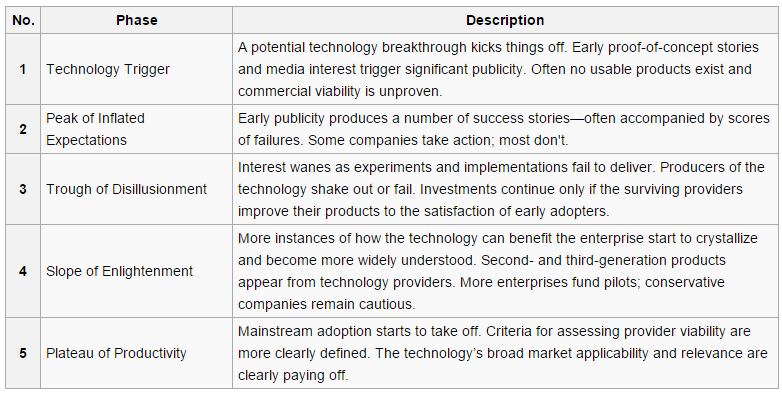
via Wikipedia
1. Get crystal clear about your goals.
What do you want your students to learn? What do you want them to be able to do? Try not to think of the tasks you want them to do; focus on the end goal.
2. Review your previous activities (if you had them) and identify what you liked about them.
What made the most difference for students? What really got them thinking? Again, try not to think about “this worksheet was good” or “this chapter covered it well” … focus on the experiences of the students and the gains they got from them.
3. Take your goals and your favorite parts of previous activities and match them to tools with those same strengths.
Scan through lists of apps and websites with a discerning eye. (They’re all over the place. A few quick Internet searches will uncover several!) Which one (or ones) can combine your essentials — even if you don’t yet know how you’re going to use it?
They say that there are no bad questions during brainstorming. There are no bad ideas or bad digital tools at this point as long as they have the potential to help your students reach their goals. You don’t immediately have to have the right answers. Embrace the process — even if there’s some uncertainty in it. (That’s part of the adventure.)
5. Generate several ideas for potential activities.
Make a list of things your students could do with the technology that would reach their goals. Identify what you like and what you don’t and then do some tweaking to get it right. Eventually, some of those ideas will fall to the back of the pack and you’ll have some favorites.
Provide your students the goals and some ideas for activities and tools to reach them. Then see what they think — if they have any new ideas, different ways to follow through on your previous ideas, new tools to suggest. Ask some colleagues or post your thoughts on social media to gather feedback. We don’t have to be lone wolves — there’s a big pack of people to help us out!
7. Finalize your ideas and put them into action!
Action is important — even if you aren’t an expert in new tools yet. Students are pretty sharp and can help you work through the technical parts of your new plan (and if they do help, that doesn’t mean you’re less of a teacher!). Jump in with both feet, and even if it doesn’t work out perfectly (even if it blows up in your face), your students will probably appreciate your willingness to try new things.
8. Be flexible and be ready to change.
Reflect on your new activities afterward. Ask your students what they liked about the activity and how good it was for teaching them. If something flops early on in the new activity, be ready to revise it or even try it again completely the next day. We don’t have to be perfect. The acronym FAIL (First Attempt In Learning) applies to teachers too!
What activity/activities did you come up with as you thought through the SAMR framework? Share your ideas with the group by filling out this survey. Then take a look at everyone’s ideas in the spreadsheet of results!
(Can’t see the form below? Click here to open it in a new tab.)


Rethinking SAMR, TPACK and using technology well — I used to think of using the SAMR and TPACK tech integration models as “climb as high as you can” models. Now I see them differently.
How high up the edtech ladder do you climb? — Introduction to the SAMR (substitution/augmentation/modification/redefinition) model.
10 ways to reach SAMR’s redefinition level — Redefinition is at the top of the SAMR model, and most educators want to know how they can reach it. This post lists 10 ideas for redefining learning with technology.
A SAMR deep dive: Deconstructing SAMR with examples — Matt talks with Noah Geisel, 2013 ACTFL Teacher of the Year, about what SAMR looks like in a classroom at each level of the model.
The biggest hurdle in educational technology — and how to clear it — Moving from augmentation to modification may be the toughest move in integrating technology. Here are eight steps you can take to help you clear that hurdle.
The Current State: Educational Technology — Tim Klapdor examines educational technology through the lens of SAMR and the Gartner Hype Cycle.
A discussion about technology in the classroom — In this YouTube video, two “teachers” discuss how to use technology — and use it well — in the classroom through the SAMR lens.
Session expired
Please log in again. The login page will open in a new tab. After logging in you can close it and return to this page.
