

The best features of game shows can be used to review and teach in the classroom. Kahoot!, Wayground, Quizlet Live, and Gimkit can help. See their pros, cons and what makes them different.
As a child, I remember one specific thing I always looked forward to on days when I stayed home sick from school — The Price Is Right.
Even aching, sick to my stomach or feverish as I laid on the couch, I made sure the TV was tuned to that game show around lunch time.
I loved the unique games. (Playing Plinko was a dream of mine!) I always guessed right along with the contestants during the Showcase Showdown at the end of the game. Bob Barker was the consummate host and kept things moving.
Now, teachers can bring that experience into the classroom when students aren’t home sick.
Several digital tools created for the classroom bring those exciting experiences to students with learning as the focus.
Even though there are lots of options out there, I always refer back to "The Big 5" ...
- Kahoot! (kahoot.com)
- Wayground (wayground.com)
- Quizlet Live (quizlet.com)
- Blooket (blooket.com)
- Gimkit (gimkit.com)
These “game show classroom” websites do a number of things …
- Create an electric atmosphere for answering questions.
- Provide fun, interesting repetitions.
- Make in-the-moment feedback possible.
It's easier than you think to bring the fun and excitement of a game show to your classroom. Scroll down (or click one of the icons below) for TONS of tools, tips, templates and resource to start using in your class now!
In this post, you'll find:
- Comparing the "Big 5" for online review games (a comparison of the major online review games)
- 10 more games like Kahoot! (for more options beyond the "Big 5")
- 8 Google Slides game show templates (for customizable, Google Slides games)
- 14 ways to turn your class into a game show (tips from teachers about creating a classroom game experience)
Comparing the "Big 5" for online review games
Click on any of the five below to jump to that section to learn more.

Turn YOUR classroom into a game show!
Click on any image below to be taken directly to that section.


Kahoot! (kahoot.com)

Explore premade games (including those included with your free account in the Kahoot library.
Source: Screenshot from kahoot.com
Summary
Kahoot! (kahoot.com) is the granddaddy of the game show review games, launched in August of 2013. Since then, Kahoot! has grown considerably with offerings to businesses and professionals and also emphasizing higher education. Rather than a simple free in-class game, Kahoot! has grown to offer a variety of modes -- at a variety of subscription price points.
In a standard Kahoot! game, questions are displayed to students on a projector or display. Students respond on their own devices.
Pros
Shared Experience: Everyone looks up at the main board and responds at the same time, giving you natural "pause points" to teach and explain tricky concepts.
Massive Community Library: Millions of publicly created Kahoots exist that you can clone, tweak, or play on the fly.
Instant Familiarity: Students know the iconic music and gameplay instantly, meaning zero downtime explaining instructions.

Source: Screenshot from kahoot.com
Cons
Speed Pressure: The fast pace of standard games can leave slower processing students feeling rushed or frustrated.
Tightened Free Limits: Free account tier limits have tightened over time, placing player caps on live games (40 for educators) that might impact larger class sizes.
Unique features
AI Question Generator: Paste a link, upload a document, or enter a prompt to generate balanced multi-choice questions in seconds.
Kahoot! Courses: Combine slides, videos, documents, and Kahoot! games into a structured learning path or chapter unit.
Alternative Game Modes: Play team modes like Color Kingdom or Tallest Tower for a more cooperative twist beyond the standard leaderboard.
Alternative ways to play
- The Blind Kahoot! game. It’s a way to teach with Kahoot! instead of just reviewing. Throw students a tricky question at the beginning. Then use images, videos, class discussion and questions to teach it. It’s scaffolding — teach a little, ask a question, repeat, repeat, repeat. Learn all about the Blind Kahoot! game in this blog post! (PS: There's a template in the Kahoot! template library to get you started.)

Wayground (Wayground.com)

Choose from different session modes. Source: Screenshot from Wayground.com
Summary
After a decade of evolution, Quizizz officially rebranded to Wayground. The name shift reflects its growth from a simple "gamified quiz app" into an all-in-one learning and curriculum platform. Wayground takes the excitement of a review game and puts the entire control panel into the student's hands. Unlike standard Kahoot! where everyone looks at a central projector screen, Wayground displays both questions and answer choices directly on individual student screens at their own pace.
Pros
Student-Paced & Low Stress: Students work through questions at their speed without feeling rushed by a timer or peers.
Paper Mode: Run live, gamified quizzes without student devices using printable QR-style response cards (similar to Plickers).
Inclusive Accessibility: Built-in read-aloud functionality, dyslexia-friendly fonts, screen customization, and instant language translation across 25+ accommodations make it a leader in differentiation.

Source: Screenshot from quizizz.com
Cons
- Less Shared Buzz: Because every student is working on a different question at a different time, you lose a bit of that shared, synchronized classroom "gasp" moment.
Unique features
- Wayground AI Suite: Generate quizzes and lesson bundles directly from YouTube videos, web URLs, PDFs, or photos of physical worksheets snapped on your phone.
- VoyageMath & Curriculum Bundles: Adaptive math tools (like VoyageMath) and standards-aligned lesson maps expand the tool far beyond simple trivia checks.
- Interactive Video Assessment: Drop assessment questions straight into embedded videos without leaving Wayground.
Alternative ways to play
- The Fast and the Curious eduprotocol. By using Wayground in this way, you reduce (or eliminate) your need for worksheet-based homework. Play a quick Wayground game and look at the results. Do a quick re-teach or mini-lesson about students’ struggles. Replay the game immediately. Repeat this on Monday, Tuesday, Wednesday. On Thursday, if students average a 90 percent or higher, give everyone an A and move on. Jon Corippo, co-author of The EduProtocol Field Guide, describes The Fast and the Curious eduprotocol on this episode of The 10 Minute Teacher podcast.
- Student-created Wayground games. Students can submit questions to be asked in a Quizizz game using Google Forms survey. Import the data from the spreadsheet connected to the survey into a Quizizz game instantly and play the game. It’s low-prep, student-driven review fun! See how in this tutorial video by California educator Joe Marquez. And, hear Wayground founder Deepak Joy Cheenath describe it in this episode of the Ditch That Textbook podcast. (Note: Spreadsheet import is an option for Kahoot! too.)

Quizlet Live (quizlet.com/live)

Explore fun ways to study with Quizlet games like Blocks and Match. Source: Screenshot from Quizlet.com
Summary
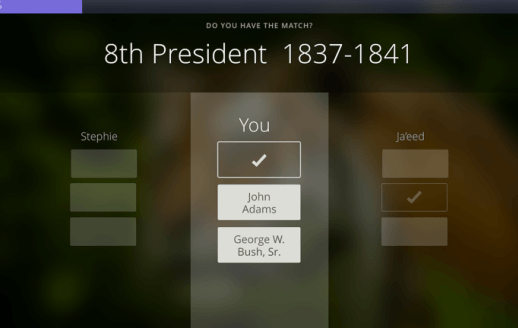
Quizlet Live turns vocabulary and definition review into a team sport. Instead of individual speed runs, Quizlet Live breaks students into small groups. The magic happens in answer distribution: all potential answer choices are divided across the devices in the group.
Need to know how to set up and run a Quizlet Live game? How to start a Quizlet Live game in 60 seconds + tips and tricks
Pros
- Unmatched Collaboration: Students must talk, look at each other's screens, and communicate. One dominant student can't hijack the game because they don't have all the answers on their screen.
Source: Screenshot from quizlet.com
- Zero Prep with Existing Decks: If you already use Quizlet flashcards, you can launch a live game in under 60 seconds with no extra setup.
- A new game every time. Each new Quizlet Live game is different. When a game pulls a dozen cards from a Quizlet flashcard set, there are tons of combinations — especially when there are LOTS of flashcards. Start a new game and Quizlet mixes up the cards for a new combination.
Cons
- Minimum Player Count: Requires at least 6 students (2 teams of 3) to run, making it less ideal for small intervention groups or individual solo practice.
- Paywall Shifts: More individual study features (like Learn mode and full practice tests) now require a paid Quizlet Plus tier.
Unique features
Quizlet Checkpoint: A quick, lower-stakes formative game mode built for fast 5-minute warm-ups or exit tickets.
Magic Notes & AI Generators: Transform raw class notes, lecture outlines, or uploaded documents directly into structured flashcard sets and practice tests.
Alternative ways to play
- Quizlet Quarterback. This game further ensures that one dominant student doesn’t hijack the game. In a group of three, set all three student devices next to each other on desks. Two students sit and one student stands behind them. When a question appears, the standing student reads it and finds the answer. He/she taps the shoulder of the student closest to the question and that student answers the question on the screen. This is one of several alternative Quizlet Live games suggested by New York educator Patrick McMillan in this post.
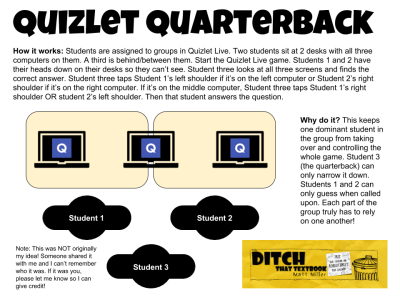
Click for full-size image (with more legible text!).
- Relay. In this game, line up all student devices in a row. Students take turns answering questions. This is another alternative Quizlet Live game suggested by New York educator Patrick McMillan in this post.


Blooket (blooket.com)

Choose from different game modes (some are only available on the paid plan but many are free!)
Source: Screenshot from blooket.com
Summary
If you ask middle school or high school students which game they want to play, Blooket is often top of the list. Blooket takes review questions and embeds them inside fast-paced arcade game loops—like Tower Defense, Crypto Hack, or Gold Quest. Answering questions correctly earns students energy or coins to build defenses, steal points, or upgrade their character avatars ("Blooks").
Learn what you need to thrive with Blooket in our post: Blooket: A game-changer for engaging students in the classroom
Pros
- Familiarity. Many students have played games like those that they play in Blooket. When you start a new Blooket game, it doesn't take long for students to get it.
Source: Screenshot from gimkit.com
- Unrivaled Student Buy-In: The game mechanics mimic popular mobile/browser games that students already love to play.
- High Variety: You can use the exact same question set to host 10 completely different game styles across a unit.
- Great Solo Practice: Assigning Blooket game modes as homework or asynchronous practice yields surprisingly high completion rates.
Cons
- Distraction Risk: The arcade action can sometimes overshadow the actual review questions if students focus purely on game strategy over content accuracy.
Unique features
Seasonal & Event Modes: Limited-time events (like Monster Brawl or holiday themes) keep the experience fresh throughout the school year.
Blook Upgrades: Students love collecting points during games to unlock new, rare Blook avatars in the store.

Gimkit (gimkit.com)

Source: Screenshot from gimkit.com
Summary
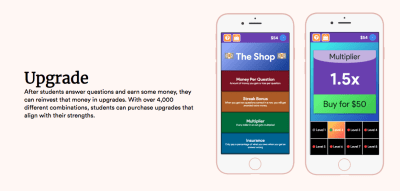
Created by high school student Josh Feinsilber (now a full-time edtech platform founder), Gimkit feels like an indie game studio built inside a review app. Students answer questions to earn in-game currency, which they reinvest in multiplier upgrades, power-ups, or strategic saboteurs.
"We don't do tests." Learn how teacher Omoyemwen Ngei uses Gimkit to create assessments her students love.
Pros
Gimkit 2D Environments: Gimkit revolutionized its platform with top-down 2D worlds (Don't Look Down, Snowbrawl, Tag, Floor is Lava), turning review sessions into full interactive adventures.
Source: Screenshot from gimkit.com
- The backstory. Gimkit was created by a student in Seattle, Washington, and it’s still maintained by him. They made the game they wanted to play and then shared it with the world.
- Quizlet integration. You can import a Quizlet flashcard set into a Gimkit game.
- Deep Strategic Thinking: Students learn basic economic strategies—balancing immediate spending on power-ups against long-term point multipliers.
Cons
- Learning Curve: Some of the custom 2D modes require a few minutes for students to figure out movement and objective rules compared to basic flashcard games.
Unique features
- Gimkit Creative: Students and teachers can build their own custom 2D maps, game rules, and obstacle courses from scratch.
- Gimkit Ink: Publish student writing, stories, and research reports with built-in peer feedback tools directly on the platform.
Which "Big 5" tool should you pick?
Choose Kahoot! if... you want a classic, high-energy, whole-class experience centered around a shared front display.
Choose Wayground (formerly Quizizz) if... you need differentiated, self-paced practice, detailed data reports, adaptive math features, or non-tech options like Paper Mode.
Choose Quizlet Live if... your primary goal is vocabulary mastery and getting students talking face-to-face in small groups.
Choose Blooket if... you want max student enthusiasm for quick review sessions using arcade mechanics.
Choose Gimkit if... you want immersive 2D multiplayer world-building and strategic gameplay that keeps students hooked for longer review sessions.
Enroll in the Game Show Classroom online course!

What you'll get...
🛠 Tools to make review and practice more like a game
💡 Ideas for turning the classroom into a game
🎨 Design tips
🧩 Inspiration to build your own games
10 more games like Kahoot!
1. 99math
Like Kahoot! for math. 99math is a free tool that turns math into a social gaming experience. The content is already generated, teachers just have to choose the topic they want to practice and no time is spent on preparation. Setting up the game and playing with students takes only 5 minutes from the lesson! Learn more about 99math in this post by Karly Moura.

2. Baamboozle
Baamboozle is a fun game to play with your class as a bell ringer, check in, or review lesson. Play from a single device on a projector, smart board or in an online lesson. No student accounts are needed. It's simple to set up. The free version of Baamboozle allows you to make your own games to play with your class. The paid version ($7.99/month) gives you access to the premium features including a library of over 150 pre-created games.

3. Factile
Factile lets you create or play jeopardy-style quiz games for your classroom. The free version allows you to create up to 3 games and play any of the pre-created games. The Pro version ($5/month) gives you access to premium features like adding images, videos and equations plus the ability to create unlimited games.

4. Quizalize
Quizalize is another quiz-based website. Teachers can create quizzes with multiple- or two-choice question sets or single-word responses. The free version allows you to assign quizzes with follow-up resources and see results for up to 3 classes and 5 activities. The premium version ($5.75/month) gives you access to the features like unlimited classes and activities.

5. Wordwall
With Wordwall you can make custom activities like quizzes, match ups, word games and more for your classroom. Wordwall activities can also be printed out directly or downloaded as a PDF file. The printables can be used along with the interactive or as stand-alone activities. With the free version you can create up to 5 activities. Standard and Pro accounts start at $6/month.

6. Pear Deck Flashcard Factory
Flashcard Factory by Pear Deck, is a neat FREE tool to let students “crowdsource” the flashcards they’ll use to study.
Check out this tutorial video, which walks you through the steps …
- Create the list of terms
- Invite students to collaborate
- Collect student images and example sentences
- Vote for the best ones
- Create a Quizlet flashcard set with what students createdAdd the flashcard set to Google Classroom

7. Flippity
Flippity is like the game making jackpot. You can easily turn your Google Sheets into BINGO, quiz shows, flashcards, scavenger hunts, leaderboards and more. All for FREE!

8. ClassTools.net
With ClassTools.net you can create free educational games for the classroom. Check out the fun options like the arcade game generator, Pacman quiz generator, QR treasure hunt generator, and Fling the teacher!

9. My Free Bingo Cards
With the Bingo card generator you can create randomized bingo cards for free. You can print and play your bingo cards share links to play virtually which makes it a great option for in-person or remote learning. Check out their school Bingo and young kids Bingo with categories like English, Geography, Languages, Math, Music, Reading, and Science and start playing right away.

10. Plickers
This free app has been around for awhile and is still a fantastic option for quick polling in the classroom. With Plickers only the teacher needs to have a device because students hold up a paper card to show their answer.

Get the book on this subject!
Tech Like a PIRATE shares seven key ways to make learning with tech UNFORGETTABLE! You'll get practical ideas, downloadable templates, step-by-step tutorials and more. Your students will be engaged and begging for more!
8 Google Slides game show templates

1. Who Wants to be a Millionaire
Test your knowledge with this template based on the famous TV quiz show, give the correct answers, and win!
2. Frazzle
This game which is similar to "Heads Up" requires the teacher to only give the category and the students then have to get their teammates to guess them by providing clues. Created by Ryan O’Donnell. You can find even MORE game templates from Ryan on his YouTube channel.
3. Jeopardy Template
This Jeopardy! interactive template by Slides Carnival will help you create a custom game for your classroom based on the popular trivia game show.
4. Family Feud
PowerPoint Jeopardy! has been done for years -- probably decades at this point. How about a Family Feud game instead? Find out How to add a Family Feud-style game to your next class/PD in this post.
5. The Price Is Right
In a gamified classroom old classics like “The Price Is Right” can make a comeback in the using G Suite tools! This game template, created by Jen Walter, has all students shouting "Come on down!".
6. Do You Remember?
This template, created by Matt Meyer, is based on the old children’s game “Memory”. You can use it to create review games across any content areas. Also check out this Memory game created by Mandi Tolen.
7. The Product Game
Have you ever played Product Game? This template, created by Theresa Wills, allows kids to play using interactive Google slides. That means that when one student moves a game piece, the other student's slide updates too! Click here to get all of of Theresa's amazing templates!
8. A game board template for anything!
Make your own game, or better yet have your STUDENTS make their own game and play it as a class! You can use this template from Slides Mania to turn any topic into your very own class game.
14 ways to turn your classroom into a game show
The music, the lights, the energy, the excitement of winning and the agony of defeat. Gameshows are engaging and fun. It’s no wonder that our students love to be a part of game show style learning in our classrooms.
So how can we help students feel the thrill of winning? Or the agony of defeat? And what apps or tools are already out there to help turn your classroom into your very own “game show”?
During a weekly #DitchBook Twitter chat, educators tackled these questions and more. They shared links to resources, examples, ideas for putting a creative spin on familiar games!

1. Play the part! Bring the music and your best game show host voice to really get the class involved.
A3: The host of the game show is what really makes a show.We can all name a game show we don't like and usually it has to do with the host.Make sure you're invested, over the top and excited to be hosting the game in your classroom and the Ss will pick up on your vibe. #ditchbook
— Nicole Nowlin (@nicole_nowlin) October 25, 2019

2. Add Family Feud style fun to your class or PD with a survey from your own community of learners. Use this Family Feud game template to get started.
A2 - I did a PD where we played family feud and teachers tried to guess the top 100 answers from their students... #ditchbook
— Sarah Warren (@wizardwarren) October 25, 2019

3. Quizizz is a fun, way to engage students in review and assessment at school or at home. And best of all, it’s free. Pair it with the Fast and Curious EduProtocol and you can really level up the fun!
A2. Love me some @quizizz
— Corey Mathias (@EdTechAntics) October 25, 2019
. Level it up with some #FastandCurious @eduprotocols
. Turns it into instruction and the motivation is insane. #ditchbook

4. Quizlet and Quizlet Live turn learning vocabulary into a fun and exciting game. New to Quizlet? Check out our post if you aren’t sure how to get started with Quizlet Live. You can play Quizlet Live in lots of different ways to keep it fresh and engaging.
A2: @quizlet @quizizz @GetKahoot @gimkit and many more! I still remember having a classroom next to the dean's office and having both deans visit my room the first few times my classes played Kahoot! They eventually realized what was going on... #ditchbook https://t.co/tP3YMgg5ie
— Kyle Anderson (@AndersonEdTech) October 25, 2019

5. Flippity.net allows you to turn a Google Spreadsheet into a game. Try the scavenger hunt, BINGO, matching games and more!
A2: @flippitynet also has some great tools for game-based learning like Jeopardy-themed quiz game generator #DitchBook
— Tom Sweeney (@trsweeney44) October 25, 2019

6. An arcade game generator, Fakebook profile, random name picker, image reveal. Those are just a few of the fantastic tools available for FREE on classtools.net.
A2 this site is pretty amazing for putting some cool stuff out there, even for those that may be scared of tech. https://t.co/zPubEAImjk #DitchBook
— Dr. Lance McClard (@drmcclard) October 25, 2019

7. There is a reason why Jeopardy has been on the air for so long. Kids and adults love to play it! Check out #5 in this post for a template to make your own Jeopardy game in Powerpoint or Google Slides.
A2: I💖using Powerpoint for Jeopardy. Animations, Linked slides, dim lights, the Jeopardy theme song, I go all out. All Ss write Qs on 1 side of a white board paddle & keep track of $ totals on the other side. The Ss love the think theme 𝅘𝅥𝅮 during final Jeopardy. #ditchbook
— Vicki (@33heupel) October 25, 2019

8. Wheel decide is a fun way to bring a little game show fun even if you only have a few minutes. You can add your own choices in or check out their premade wheels for a quick time-filler.
A2: https://t.co/HJbpHnashQ is a fun one #DitchBook
— Craig Klement (@craigklement) October 25, 2019

9. Gimkit is quickly becoming a favorite among teachers and students. It’s like Quizlet but with power-ups. Gimkit has tons of engaging themes too like Thanos mode or zombies vs. humans. Check out our post Game show classroom: Comparing Kahoot!, Quizizz, Quizlet Live, and Gimkit to learn more.
Q2 What apps or tools can help turn your classroom into a "game show"? #DitchBook pic.twitter.com/KwdLj4XxKM
— Ditch That Textbook (@DitchThatTxtbk) October 25, 2019

10. Head Bands with index cards is the perfect, tech-free, game show style option for vocabulary review.
A4: a great one for vocabulary is Head Bands, although I just used index cards #ditchbook pic.twitter.com/3hZaMMjM9Y
— Craig Klement (@craigklement) October 25, 2019

11. Who Wants to Be a Millionaire can be played using questions from any subject. Check out #4 in this post for a Who Wants to Be a Millionaire game template in Google Slides.
A4: I have used a “Who Wants to Be a Millionaire” template and inserted my own questions. Every time I would ask a question, we turned the lights off and played the dramatic music 😊 #Ditchbook
— Megan Maxwell Naglik (@MeganNaglik) October 25, 2019

12. The chance that ANY of audience members could be called to play makes The Price Is Right even more exciting to watch. Check out this Price is Right Estimation game created by Jen Walter that turns math into a game show by asking students to “come on down!”
A4: The Price is Right #ditchbook ! Ss practice metric measurements and estimation with little dollar store prizes! It's always a big hit!! pic.twitter.com/eU1vllhqqs
— Jen Walter (@JWalterTeach) October 25, 2019

13. Create your own Google Slides class baseball review game for any subject. Alice Keeler has provided everything you need to get started including directions and a template!
A4: @alicekeeler has a fun baseball activity that brings gaming and competition into the classroom https://t.co/y88pcVQ53u #DitchBook
— Craig Klement (@craigklement) October 25, 2019

14. Kahoot! is always a student favorite. The music alone turns up the engagement level (and the noise level) in any classroom. There are lots of different variations for playing. Try a blind Kahoot!, ghost mode, team play, or even a connected Kahoot!
A3: I think the feeling of success can be felt by any student. Especially if you play multiple rounds. @GetKahoot has Ghost Mode, so you can play against yourself to track improvement. Let all Ss feel the thrill of victory! #ditchbook https://t.co/0XsiXsXMtM
— Evan Mosier (@emosier3) October 25, 2019
These aren’t the only options for reviewing in this way. If you use others, we’d love to see them in a comment below along with why you think they’re great.
Question: Which tools have you used, and what was your experience? What other similar tools have you used? Leave a comment below.
For notifications of new Ditch That Textbook content and helpful links:
Are you looking for quality, meaningful professional learning that both equips and inspires teachers?

Matt provides in-person and virtual keynotes, workshops and breakout sessions that equip, inspire and encourage teachers to create change in their classrooms. Teachers leave with loads of resources. They participate. They laugh. They see tech use and teaching in a new light. Click the link below to contact us and learn how you can bring Matt to your school or district!
Is Matt presenting near you soon? Check out his upcoming live events!


This resource had interesting games to use
Still a big fan of Kahoot! I found these other options very entertaining as well. I will be checking into them further. Thank you for such thorough information.
The teachers do like Gimkit and Blooket for content and review. The students love them because they have games attached that are not educational but we do not block because of the educational benefits of the sites.
very helpful for class use!
I really love the concept of Quizizz, the points do really add a bit of competitiveness to the quiz games and keeps the student engaged. I personally prefer and use Kahoot, I wish they cloud implement something like that to make it even awesome. Let’s not forget that they all bring the fun back to learning, way better than the textbook quizzes Thanks For Sharing this Great Post, We really glad to read … BY Salima FERHAT-FLL
This is an interesting blog! I used to have games in my class when I was a teacher. It made think of going back to my original thing. Thank you so much..
BY Salima FERHAT-FLL
Very Informative. I found Quizizz is more teacher / student friendly………BY Salima FERHAT -FLL
you forgot blooket which is obviously the best one and way better than kahoot.
Excellent article. Very interesting to read. I really love to read such a nice article. Thanks!
Thanks! GTU
Blooket is the newest game site I have discovered that provides a bit more variety in the game options, although Q&A is still the traditional multiple choice format as far as I know.
I used Quizlet Live and Kahoot…somehow I feel my students get more excited when we play Kahoot. Anyway, both are great for checking their understanding.
I use all of these and the new gimkit among us is a crowd pleaser. I have to work to learn the new features of the other game sites because i think i am not using them all to their potential.
I really like the idea of a game that allows collaboration like the Quizlet Live. It is important not to let one student monopolize so the others can have a chance. My students are very quick to copy someone else even if it is wrong. Although Kahoot does seem to be more exciting.
You can customize the time limit on Kahoot 🙂
I haven’t used any of these games. Are they good resources for kindergarten students who can’t read questions?
Just read your complete article “Game show classroom: Comparing Kahoot!, Quizizz, Quizlet Live and Gimkit” is really very informative. Found too much concepts. I have just Instantly shared this post with my friend Smriti Chawla (98765-43210) from Delhi Public School. Thanks a lot!
Great tools with pros & cons. I have tried another i. e Factile( https://www.playfactile.com/) & found it very interesting.
I think kahoot is good but gimkit is better. It gives kids a chance to use the money they have earned to invest in powerups which also teaches financial skills and money management
I really love the concept of Quizizz, the points do really add a bit of competitiveness to the quiz games and keeps the student engaged. I personally prefer and use Kahoot, I wish they cloud implement something like that to make it even awesome. Let’s not forget that they all bring the fun back to learning, way better than the textbook quizzes.
Yes! Thanos mode! I thought about that but didn’t add it to the post. Glad you added it here! I had not heard of Quizwhizzer and will check it out. Thanks for your comment!
I have also been using Quizwhizzer in my Spanish classes. It plays like a big board game, and recent updates have added an option to make them retry questions when they get them wrong, and “on fire” streaks where digital fire literally plays across the screen. I have my students do more involved fill in the blank things here and play in pairs and they (mostly juniors and seniors) are incredibly engaged and love watching their pieces move on the game board on the screen. Thus far the free version has been plenty robust for my uses. And as a bonus, this tool was also developed by a high school student to help out his teacher!!
Also – our department chair got a bulk discount on getting us Gimkit premium subscriptions. I rarely pay for tools like this, but Gimkit is absolutely worth it. My kids LOVE IT. And the limited time “special modes” he puts out keep it even more interesting. Just ask about “Thanos mode” to someone that watched kids play it. Great stuff.
Language Teachers!! Check out Fluentkey.com! Think Edpuzzle/Playposit with Kahoot style game! Uses *authentic* language videos….news, commercials, music, etc.!!
This is my issue with it too. And I have lots of others- though my students love the game and I plan to keep using it unless I find something more user-friendly.
1) it only shows which groups are in the top 5..well we have 15+ groups and I’d like to know how the others are doing.
2) it only shows the winners for like a split second at the end so I have to snap a picture of that with my phone because it’s impossible to get back to it.
3) they make the question appear sooo small up at the top then there is this HUGE “Kahoots” sign right in the middle. It’s kinda annoying.
4) Making the questions is really tedious, I wish I could easily transfer these games which I already have prepared from PowerPoint.
5) I wish we could copy and paste images instead of just drag/drop, which never works.
All in all it is wayyyy too time consuming just to create one game. I don’t think it’s user-friendly for the teachers. I have contacted Kahoots and told them my complaints. They said that they purposely keep the limit short for their questions to “maximize engagement.” They didn’t seem to consider that what they’ve actually done is make it very rigid and inflexible, which means that less people will use their website in the end.
KAHOOTS I hope you read this.
I love Quizlet and quizalize!They are my favourite ones! The team behind quizalize rocks! They are by my side be it day or night! I am not exaggerating. I have made over 1000 tests …and… their life miserable as well with my requests even after midnight but they always DELIVER ! HOOPS THE NEW GAME IS WONDERFUL! I have used practically everything, triventy, gosoapboax, socrative, formative … my heart lies in the hands of Quizalize and Quizlet 🙂
How to handle inappropriate nicknames—-
https://getkahoot.com/support/faq/#how-to-handle-inappropriate-nicknames
Thanks for the great website recommendation. I’ve been integrating Kahoot in my classroom for just a few weeks and my students have just loved it. My kids are starting to have longer attention spans and better grades. Unfortunately, some disrespectful kids in my class use some Kahoot hacks to take away the fun and learning from the game. A few kids flood my Kahoot quizzes using hundreds of fake usernames which destroys the purpose of this game. Also, a few kids hack the Kahoot answers and get everything right somehow. These kids are the ones who usually are troublemakers and get terrible grades. Do you have any ideas on how I can fix this?
Has anyone found a quiz that can accept numerical answers rather than multiple choice answers?
Also the time limit on Kahoot is a pain. especially for more involved problems.
I have recently discovered the Triptico website and it’s my current favourite, though I use kahoot and Quizlet live a lot. Triptico’s version of Blockbusters, called Connect, has one down really well with my students of all ages.
These are awful programs, they do not allow for more than 4 answers to a question, have a small character limit for questions and do they allow multiple answers. This makes them good for 1st or second graders but useless for teachers who really want to test their kids. for all the comments about how they love it, I can only assume they are using it for very young grades or are creating worthless quizzes for older students, if you don’t understand this, take a look at how real tests are conducted for older kids, not like these 1 answer guesses
I’ve used Quizizz and Kahoot. I personally like Quizizz more because students can’t cheat off of others because the questions are randomized. For Quizizz I would say ditch the music and play some clean dance music in the background. My students seem to like it. I also like Bingobaker.com for a slower paced online bingo. I’ve been looking for a jazzed up online bingo but have yet to find it. I may try Quizlet live next.
Not sure if what subject area you are, but I build think time in my Kahoots.
I duplicate each question. They appear back to back.
The first question has a long time limit and is worth zero points. The answer choices are “pick red!” and “pick blue!”. Both answers are correct and the students pick an answer after they have processed the question and have an answer.
The second question is the exact same one, except it is worth points and the answer choices are all available.
This helps my slower readers and thinkers. It levels the playing field for them.
My issue with Kahoot is that it limits the length of the answer that a teacher puts in- very difficult when using AP-style questions.
Plickers. Plickers is like Kahoots, but you don’t need a device for each student. You print out a card for each student that has a unique shape on it, a number and the letters A, B, C, D. Students simply hold up the card with the letter choice they want (in response to a multiple choice question) and the teacher scans the cards with the app (sounds long, but it can be done quickly and from the front of the classroom. The scan works from quite a distance.) You can create either multiple choice or true-false questions. The results are displayed on the screen for everyone to see. Students like the anonymous feature, but you can also display names with answers. I also like it that you don’t have to display everyone’s answer at first (so noone is being influenced by other answers). You display only the numbers, so you can ensure that everyone has answered the question, then you can show the graph results (bar graph displays how many answered per letter), then finally, you can show the result (the bar lights up green on the graph). Love this progressive aspect. The app is free. You create the questions on the website, then scan with the app. Was a huge success with students!
I have used Kahoot and Quizizz a lot and like them equally for different reasons. I’m trying to get used to Quizalize. It is easy to type in the questions, but not as user-friendly to get it to run. I feel like I’m constantly clicking here and there and going back to Home to find the right place to get my students started. It’s not as flashy, but it does give wonderful data. I’m anxious to try Quizlet Live next!
Overall, my Spanish students’ favorite so far has been Quizlet Live. I originally heard about it on my Facebook networking group called “Spanish Teachers in the US.” Suddenly Spanish teachers across the USA were raving about how wonderful this application was and how very much their students liked the game and engaged in it. Many of my students in their weekly reflection papers on academic growth have expressed that Quizlet Live is the best tool they have found so far to help them learn Spanish vocabulary. My Spanish I students literally beg me to play it.
Thank you for all the resources, tool and knowledge, Matt. You have inspired and encouraged me for a long time to ditch the textbook more and more often and use these interactive tools in my classroom, and I am a better teacher for it.
Hi Matt, thanks very much for the write up! We were flattered when Quizlet used our Quizalize team game view as inspiration for Quizlet Live, but it’s great to know that teachers are also valuing the data and insight we provide as this is the real value and differentiation in our products. We aim to make our Zzish teacher dashboards the best dashboards in the world for real-time insight into individual student learning gaps and so enable teachers to give one on one student-centred teaching in the classroom. Note that teachers can already use our Zzish teacher dashboards with Kahoot and we’re adding support for Quizziz and Socrative too. Teachers can simply download the excel spreadsheet at the end of a Kahoot session and import them into Zzish. Many thanks again for your kind support and we’re always delighted to hear feedback and suggestions for improving our products! Charles Wiles, Founder of Zzish, creators of Quizalize.
Thanks Sylvia. I’d love to one day!
Love your “stuff”! You need to make your way out to California and provide workshops out here!
I use Plickers with my 5th grade class. I use it in place of the traditional whiteboard, but it works the same way. The students are assigned a personal QR Code type image that I have printed large on white cardstock. The cards are anonymous and it is not easy to tell what your neighbor has answered. It eliminates the copying that occurs when some students put up their answers on a whiteboard. I then stand in front of the room and move my phone around to scan the cards. I quickly get a red or green flash to see right and wrong answers, and “magically” the data appears on the screen. They can keep their cards all year, and I just create new sets of questions to go with our units of study. It’s fun and different!
My students and I absolutely love Quizlet Live. I wrote a blog about it. It has definitely increased the learning and engagement, as well as communication and collaboration in my French classroom. Check it out: http://techietrude.blogspot.com/2016/04/liven-up-your-class-with-quizlet-live.html
I have used Kahoot since last year and Quizlet for many years. My kids loved Kahoot when I started using it, but now, Quizlet Live blows everything else away. My students asks me every day if we are going to do Quizlet live. The team aspect of the game makes it even better, as the students feel accountable to each other so they do their best.